
Publishing endless articles but seeing flat traffic and scattered rankings is frustrating, especially when your keyword list is a tangled mess. The issue usually isn’t a lack of keywords—it’s the lack of structure. Without clear, intent-based clusters, your content competes with itself, wastes crawl budget, and confuses both Google and AI search engines.
This practical guide walks through each step of advanced keyword clustering, from grouping semantic topics to organizing SERP-based clusters, then turning them into focused pages and supporting content using Keywordly. You’ll see how to integrate clusters directly into briefs, outlines, and internal links, what effort is realistically required, and the impact on rankings, topical authority, and organic traffic once your content plan is built around smart, scalable clusters.
In a world where Google and ChatGPT are quietly rewriting the rules of discovery, advanced keyword clustering isn’t just a ‘nice-to-have’—it’s the strategic backbone of SEO content planning, and platforms like Keywordly are the difference between guessing what to publish and engineering what you rank for.
Reference:
Keyword Clustering: The Advanced Guide to Keyword … – Moz
Clarify Your SEO Goals Before Building Keyword Clusters
Define business and content goals for clustering
Before you create semantic or SERP-based clusters in Keywordly, decide what success actually looks like. Are you trying to double organic traffic, capture more demo requests, or build topical authority around a theme like “B2B SaaS SEO”?
For example, if your SaaS targets a $500 MRR increase per new customer, your keyword clusters should support KPIs like trial signups or demo bookings—not just more impressions. Map each cluster (e.g., “SEO content briefs” or “AI search optimization”) to a product or revenue objective so you avoid chasing vanity metrics like non-converting traffic.
Decide primary use cases for your keyword clusters
Once goals are clear, define where your clusters will live: blog hubs, landing pages, programmatic pages, or AI search visibility plays. In Keywordly, you might build deep semantic clusters for long-form guides, and tighter SERP clusters for high-intent landing pages.
For instance, create an informational cluster around “keyword clustering for content strategy” for blog posts, and a commercial cluster like “SEO content workflow platform” for feature pages. This separation helps you design formats and depth correctly and prevents thin, mixed-intent content that underperforms in both Google and tools like ChatGPT.
Map clusters to the buyer journey and content funnel
Align each cluster with awareness, consideration, or decision stages so your content system works as a funnel, not a collection of random posts. Awareness clusters might target “what is keyword clustering,” while decision clusters target “best SEO content workflow platform.”
Use buyer personas inside Keywordly’s planning workflow to tag clusters by stage and intent. For example, a content marketer researching “semantic keyword clustering examples” is likely mid-funnel, while “Keywordly pricing” is bottom-funnel. This mapping lets you design internal links from awareness posts to comparison pages, lifting both engagement and assisted conversions.
Set measurement benchmarks for success
Before launching content, set clear benchmarks at the cluster level, not just per URL. In Keywordly, define baseline metrics—current rankings, clicks, and conversions—and then set targets such as “rank top 3 for 10 core terms” or “increase organic signups by 25% from this cluster in 6 months.”
Include AI search and ChatGPT presence as emerging metrics: track whether your brand or articles appear in AI summaries for core keywords. Teams that align clusters with measurable goals often see compounding gains—stronger topical authority, better click-through rates, and more consistent traffic growth across the entire cluster, not just a single winning page.
Collect and Prepare a High-Quality Keyword Dataset
Build your initial keyword list from multiple sources
A strong clustering strategy starts with a wide, reliable keyword pool. Begin by using Keywordly to generate seed lists around your core products and pain points, then expand into related terms and long-tail variations. For example, a B2B SaaS targeting “sales enablement software” could instantly pull variants like “sales enablement tools for SMBs” and “enterprise sales enablement platforms” inside Keywordly.
Layer this with data from Google Search Console, Keyword Planner, and autocomplete suggestions to capture how real users search. Analyze competitors with strong visibility—like how HubSpot ranks across hundreds of “marketing automation” phrases—to uncover content gaps. Guidance such as Mastering B2B Marketing Keywords shows how aligning with buyer personas can surface low-volume, high-intent terms that still drive pipeline.
Clean and normalize your keyword data
Once you’ve assembled a broad list, clean it so your clusters stay focused and actionable. Remove duplicates, off-topic ideas, and branded noise that doesn’t support your current goals (for example, old campaign names or discontinued product lines). In Keywordly, you can quickly bulk-delete obvious junk like “free login” or internal tag strings that crept into reports.
Then normalize the remaining set to avoid fragmented clusters. Standardize casing, strip unnecessary punctuation, and decide how you’ll handle plurals so “CRM tools” and “CRM tool” don’t sit in separate groups. This cleaner dataset makes both semantic keyword clustering and SERP-based clustering more accurate and prevents you from diluting content briefs with near-identical phrases.
Segment keywords by topics, products, and audiences
Effective clustering depends on clear strategic buckets. Start by segmenting keywords into topical groups that mirror your main product lines or services—such as “B2B SEO services,” “content writing services,” and “SEO reporting” for a digital agency. In Keywordly, tag each keyword with these themes so you can later generate focused semantic clusters per topic.
Go a level deeper by tagging keywords to audience segments or verticals, especially in B2B. Following the persona-aligned approach in Mastering B2B Marketing Keywords, separate “SEO for manufacturing companies” from “SEO for SaaS startups” so their semantic clusters reflect different pain points, objections, and content formats. If you serve multiple regions, create separate lists for U.S., U.K., and Spanish-language terms to prevent mixing intent and search behavior across markets.
Enrich keywords with core performance metrics
A high-quality dataset isn’t just clean—it’s decision-ready. Attach search volume, difficulty, and CPC where available so you can prioritize clusters that balance traffic potential with achievability. For instance, you might favor a cluster where most terms sit under a KD score of 35 but collectively reach 3,000 monthly searches, instead of chasing a single ultra-competitive head term.
Then map user intent (informational, commercial, transactional) and note SERP features such as featured snippets, People Also Ask, or local packs. Within Keywordly, this enrichment helps you shape both semantic and SERP clusters into clear content types—guides for informational clusters, comparison pages for commercial ones, and local landing pages where map packs dominate. Over time, consistently acting on these enriched clusters can lift rankings across an entire topic, improve click-through rates, and drive steadier organic traffic growth rather than one-off keyword wins.
Execute Semantic Keyword Clustering Step by Step (Using Keywordly)
Understand what semantic keyword clustering is
Semantic keyword clustering groups queries by meaning instead of exact match phrases. In Keywordly, this lets you organize everything users search around a topic, from synonyms to related questions, into one structured view for content planning.
For example, a SaaS brand like Ahrefs might cluster “backlink checker,” “check backlinks to my site,” and “how to analyze backlinks” together, even though the wording differs. This creates a single topic hub you can turn into a guide, feature page, and supporting FAQs instead of writing disconnected articles.
Run semantic clustering in Keywordly
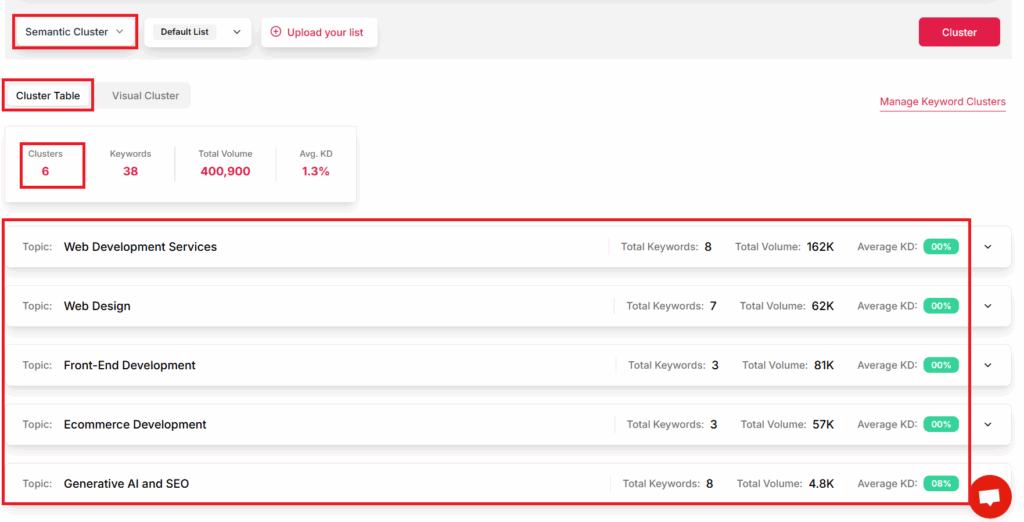
Start by importing your cleaned keyword list into Keywordly’s clustering interface, either via CSV or direct integration with your rank-tracking and research projects. Make sure you’ve removed duplicates and obvious off-topic phrases so the algorithm focuses on meaningful patterns.
Set your semantic similarity threshold to control how tight clusters should be. For a broad topic like “email marketing,” you might allow looser similarity; for “HubSpot workflows,” you want tighter clusters. Then run the workflow and review the topic-based groups Keywordly generates, such as “welcome email sequences,” “abandoned cart emails,” and “B2B newsletter strategy.”
Evaluate and refine semantic keyword clusters
Once clusters are generated, scan each one for topical coherence. All terms in a cluster should genuinely relate to the same subject. If you see “buy SEO tools” mixed with “what is SEO,” split them: one commercial cluster, one educational cluster.
Check user intent inside each group. In Keywordly, you can tag clusters as informational, commercial, or transactional, then split clusters where the mix would confuse readers or Google. This makes it easier to map each cluster to a specific content type (guide, comparison, or product page) without diluting relevance.
Prioritize semantic clusters by business value
After refining, rank clusters by traffic potential, conversion opportunity, and alignment with your goals. An agency might prioritize clusters around “SEO audit services” over “what is SEO” because the commercial intent is stronger and more likely to drive leads.
Keywordly lets you sort clusters by search volume and difficulty, helping you spot quick wins—such as a “local SEO checklist” cluster with mid-volume and low competition. Over time, publishing into both semantic and SERP-aligned clusters tends to lift topical authority, which can translate into higher rankings and compounding organic traffic growth across the entire topic.
Reference:
→ keyword-clustering-boost-your-seo-content-strategy
Reference:
→ semantic-keyword-clustering
Reference:
What is Keyword Clustering and How to do it effectively
Execute SERP-Based Keyword Clustering Step by Step (Using Keywordly)
Understand SERP-based keyword clustering
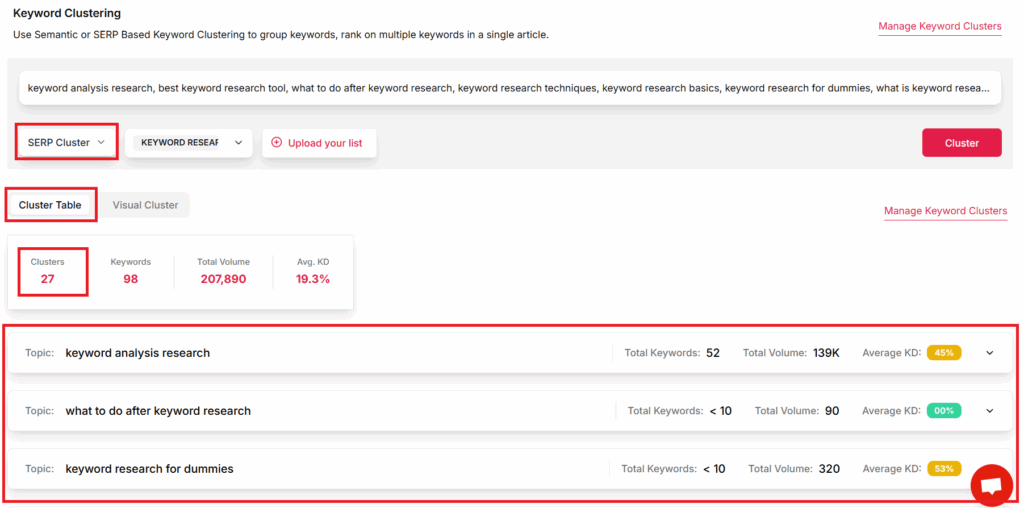
SERP-based keyword clustering starts with how Google actually groups queries in live search results. Instead of guessing user intent, you look at which URLs rank for different keywords and cluster those that trigger the same or very similar pages.
For example, if “best project management tools,” “top project management software,” and “project management apps” all show Asana, Monday.com, and ClickUp in the top 10, Keywordly can place them in one SERP cluster because Google treats them as the same topic. This approach aligns with how keyword clustering boosts your SEO content strategy by mapping real queries to focused content.
Run SERP-based clustering in Keywordly
Before clustering, load your keyword list into Keywordly from Search Console, Ahrefs, or Semrush. Then enable SERP similarity analysis so the platform can pull current top results for each query and compare overlapping URLs.
Set clear rules: for instance, group keywords when at least 3 of the top 10 URLs match, or require 30–40% SERP overlap for inclusion. In Keywordly, this is as simple as choosing your similarity threshold and running the clustering job, then reviewing clusters like “CRM for small business” vs. “best CRM software for startups” to see exactly how Google is grouping them.
Compare SERP-based clusters with semantic clusters
Keywordly lets you run both semantic and SERP-based clustering on the same keyword set. Start by generating semantic clusters using NLP similarity, then layer SERP-based clusters on top to validate whether Google agrees with those groupings.
If your semantic cluster groups “content calendar tool” with “social media scheduler,” but SERP-based clustering shows separate ranking pages and very little overlap, you know those topics deserve two pieces of content. This refinement directly supports the content mapping process described in Keyword Clustering: Boost Your SEO Content Strategy, and can mean one in-depth guide instead of three thin articles, which often leads to stronger rankings and higher click-through rates.
Handle SERP edge cases and nuances
As you review clusters, watch for mixed-intent SERPs where informational and transactional results rank together. For instance, “SEO content brief” might show tutorials from HubSpot and templates from Notion; Keywordly’s SERP view helps you decide whether to create a guide, a template landing page, or both.
Pay attention to local vs. global SERPs, like “plumber near me” versus “how to fix a leaking pipe,” and to seasonal swings such as “Black Friday TV deals.” When you implement both semantic and SERP-based clusters into your content roadmap inside Keywordly, you reduce cannibalization, create pages that better match intent, and typically see improved organic traffic, more stable rankings around updates, and higher conversion rates from tightly targeted keyword groups.
Reference:
What is Keyword Clustering and How to do it effectively
Combine Semantic and SERP Clusters into a Unified Strategy
Decide when to rely on semantic vs SERP clusters
Smart keyword clustering starts by knowing when to trust semantic relationships and when to obey the SERP. In Keywordly, you can first group terms using semantic similarity scores (e.g., “keyword clustering tools,” “SEO clustering software,” “content cluster platform”) to shape your content architecture.
Then, run a SERP clustering pass in Keywordly to compare top-10 results. If Google consistently ranks the same URLs for two queries (e.g., “SEO content brief tool” and “AI content brief generator”), target them on one page. If overlap is weak, split them into separate articles to avoid keyword cannibalization.
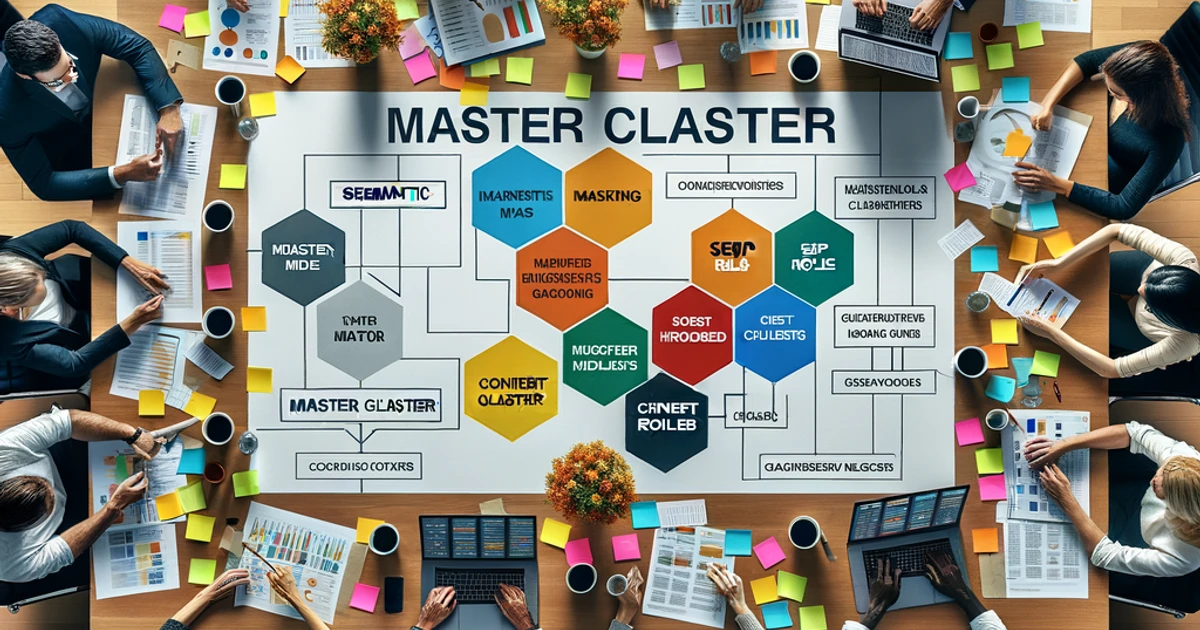
Build a master cluster map
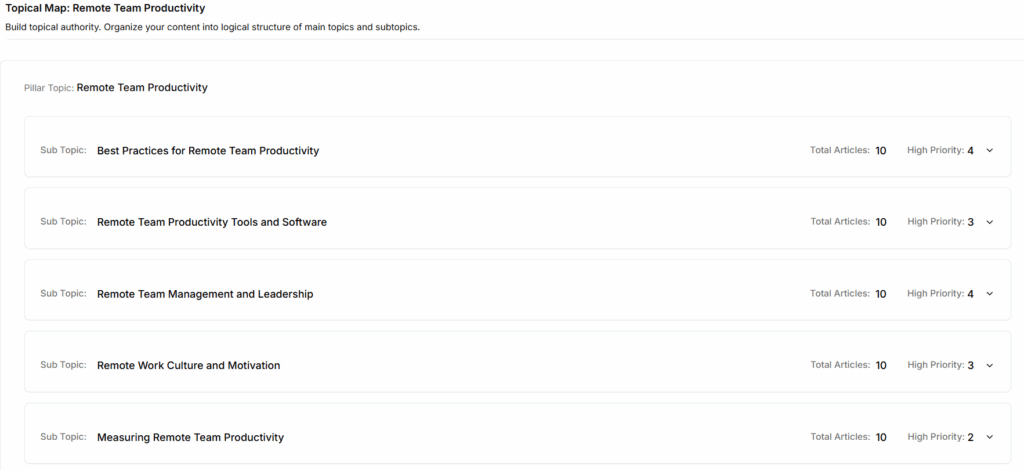
A master cluster map turns scattered keyword lists into a structured content blueprint. In Keywordly, export your semantic and SERP clusters, then organize them into themes like “Technical SEO,” “Content Strategy,” and “AI Search Optimization” that mirror your site’s navigation.
For example, an agency might create a pillar for “Keyword Clustering Guide,” with subclusters for “semantic clustering,” “SERP clustering,” and “cluster-based content briefs.” Editors and writers can reference this shared map so every new article reinforces an existing cluster instead of creating orphan content.
Define roles for each cluster in your content ecosystem
Assign pillar pages to broad, high-intent clusters in Keywordly, such as “SEO content strategy,” that deserve 2,000–3,000 word guides. Then map supporting articles to long-tail clusters like “B2B SEO content workflow” or “how to avoid keyword cannibalization,” linking them back to the pillar.
Teams that follow this model often see clearer topical authority and higher rankings. For instance, many SaaS blogs report 20–40% traffic lifts after restructuring content around pillar-supporting clusters rather than isolated posts.
Use Keywordly to maintain your cluster architecture
Cluster strategy only works if it stays current. In Keywordly, store each cluster as a living asset: tag it by topic, funnel stage, and content type, and enable version history so you can see when terms were added or removed.
Review clusters quarterly as new products, queries, or AI-search features appear. When you adjust a cluster and then see keyword groups climb from page two to page one, you can correlate that performance gain directly to your structural updates and refine your process over time.
Reference:
→ serp-keyword-clustering-tool
Reference:
→ keyword-clustering-boost-your-seo-content-strategy
Reference:
SEO to GEO: A Unified Content Strategy for Dual Visibility
Turn Keyword Clusters into a Strategic SEO Content Plan
Translate clusters into a content calendar
A strong SEO content plan starts by turning raw keyword clusters into a realistic publishing schedule. Instead of writing randomly, you map each cluster to specific weeks and campaigns so production, design, and SEO work in sync.
Step 1: Prioritize clusters by impact and effort. For example, an “email marketing for ecommerce” cluster with 2,000+ monthly searches and low competition should outrank a niche topic with 40 searches. Use a simple impact/effort matrix in Keywordly to tag clusters as High, Medium, or Low priority and then sequence them into a 90-day roadmap.
Step 2: Schedule around demand and campaigns. A retailer like REI plans “winter hiking gear” content for September–November, not April. Mirror that approach by aligning clusters with seasonality, product launches, and paid campaigns. Step 3: Mix funnel stages each month—publish one awareness guide, one comparison piece, and one decision-focused page to keep the pipeline full at all stages.
Define optimal page types for each cluster
Each cluster should map to the page type that best matches search intent. This prevents thin, duplicated content and helps Google understand which URL should rank for which intent.
Step 4: Choose formats by intent. For a “best project management tools” cluster, a long-form blog or comparison guide works best. For “Asana pricing” or “buy Asana alternative,” a focused landing page is more appropriate. Transactional clusters like “buy running shoes online” should feed into category or collection pages, while informational clusters become guides, FAQs, or tools.
Step 5: Avoid splitting one clear intent across multiple pages. HubSpot often creates one definitive guide per core topic, then supports it with internal links. Use the same model: one primary page per cluster, supported by related subpages only when there are distinct, validated intents.
Map primary, secondary, and supporting keywords
Once the page type is defined, structure your targeting so each URL has a clear focus. This helps both crawlers and users quickly understand what the page is about.
Step 6: Assign one primary keyword per page. For example, a guide might target “B2B SaaS content marketing” as the primary term. Step 7: Add 3–8 closely related secondary keywords from the same cluster, such as “B2B SaaS blog strategy” or “SaaS content marketing examples,” and weave them naturally into headings and body copy.
Step 8: Use long-tail and supporting terms in subheadings and FAQs, like “How often should SaaS companies publish blog posts?” This broadens topical coverage, increases the chance of ranking for dozens of variations, and often leads to richer featured snippets and People Also Ask visibility.
Use Keywordly to operationalize your content plan
To make this process scalable, you need a workflow that ties clustering, planning, and production together. Keywordly lets you do semantic and SERP-based clustering, then connect those clusters directly to briefs, tasks, and performance tracking.
Step 9: Build semantic and SERP keyword clusters in Keywordly
Use Keywordly’s semantic clustering to group terms by meaning, such as “content audit,” “SEO content audit,” and “blog content audit template.” This ensures comprehensive topical coverage. Then layer SERP clustering by analyzing which keywords share the same ranking URLs—if Google ranks the same pages for “content audit checklist” and “how to run a content audit,” treat them as one SERP cluster.
Attach these combined clusters to a single pillar page where intent overlaps, or separate them when SERPs show clearly different results. This approach mirrors how high-performing sites like Ahrefs structure their “keyword research” and “keyword research tools” content—one master guide plus specialized supporting pages.
Step 10: Turn clusters into briefs, workflows, and measurable impact
Within Keywordly, convert each cluster into a content brief, auto-including primary, secondary, and long-tail terms with SERP notes and content gaps. Assign tasks to writers, editors, and SEO reviewers, then track status from idea to publication in one dashboard.
Teams that follow this structured clustering workflow typically see measurable gains—organic traffic spread across more long-tail queries, fewer cannibalization issues, and higher average positions for core topics. For example, agencies adopting cluster-based planning often report 20–40% traffic growth to key topic hubs within 6–9 months as Google rewards clearer topical authority and better-aligned content.
Reference:
Better SEO and Visibility with the Pillar and Cluster Content …
Implement Keyword Clusters in On-Page Content (Practical How-To)

Structure pillar pages around keyword clusters
Start by turning each keyword cluster into a pillar page that covers the entire topic at a high level. In Keywordly, group your semantic and SERP-based keywords (for example, around “B2B content marketing strategy”) and export that cluster as the outline for a single, comprehensive resource.
Break the pillar into sections that mirror the cluster’s subtopics: “what is B2B content marketing,” “strategy framework,” “examples,” and “metrics.” Use H2s and H3s that reflect these subtopics so Google and AI engines like ChatGPT can understand topical breadth.
Then, link out to supporting articles from the pillar using descriptive anchor text, such as “B2B content marketing examples” or “content marketing KPIs.” This internal linking pattern signals that the pillar is the hub and the supporting pieces are spokes, reducing confusion about which URL should rank.
Use secondary and supporting keywords naturally
Once your structure is set, map secondary keywords to specific sections. For instance, if your primary topic is “email marketing automation,” supporting terms in Keywordly like “best email automation tools,” “email workflows,” and “behavioral triggers” can each live in their own H2 or H3.
Write the copy first for humans, then use Keywordly’s editor to check coverage and density. If you see gaps, add supporting phrases inside examples or bullet lists, not by stuffing them into every sentence.
For example, in a section on “behavioral email triggers,” mention how HubSpot saw higher engagement by sending cart-abandon emails within 30 minutes, naturally weaving in the phrase “behavior-based email workflows.”
Avoid keyword cannibalization within clusters
Keyword clusters can backfire when multiple URLs chase the same core query. In Keywordly, filter your cluster by primary keyword and identify pages that compete for terms like “SEO content strategy.” If two pieces target that query with near-identical intent, you’re likely diluting your ranking potential.
Turn the strongest page into your primary asset and either merge overlapping sections from weaker articles or 301 redirect them. Use clear internal links that say “SEO content strategy guide” pointing to the chosen canonical page so search engines know which version to prioritize.
For tricky cases where you must keep similar content (e.g., a 2024 vs. 2025 guide), apply canonical tags and differentiate intents, such as “SEO content strategy framework” vs. “SEO content strategy checklist,” to prevent cannibalization.
Optimize with Keywordly’s content editor
To operationalize both semantic and SERP clustering, bring your draft into Keywordly’s content editor. Start by selecting the semantic cluster for your target topic so the editor can show related entities, questions, and contextual phrases commonly found on top-ranking pages.
Then layer in SERP clustering insights: if Keywordly shows that “SEO content plan,” “SEO content roadmap,” and “SEO content calendar” share similar SERP results, you can answer all three intents in one well-structured guide rather than three thin articles.
As you refine headings and paragraphs, watch the real-time guidance to ensure you cover key subtopics without exceeding safe repetition thresholds. Teams that follow this workflow typically see higher topical authority, better time-on-page, and more impressions across long-tail variants, which often translates to steadier month-over-month organic traffic growth rather than isolated ranking wins.
Reference:
→ keyword-clustering-boost-your-seo-content-strategy
Reference:
→ optimize-content-for-answer-engines
Reference:
The Comprehensive Guide to Keyword Clustering in SEO
Measure the Impact of Keyword Clustering on Rankings and Traffic
Track performance at the cluster level
Once you’ve built your semantic and SERP-based clusters in Keywordly, the next step is tracking impact at the topic level, not just by individual keywords. This helps you see whether your entire “Email Marketing for SaaS” or “Local HVAC Services” cluster is gaining visibility as a whole.
Start by grouping all keywords in a cluster and monitoring the average position, impressions, and share of voice over time. For example, an agency working on a “B2B SEO” cluster can track the mean ranking across 40 keywords instead of obsessing over just “b2b seo agency.” This shows whether Google recognizes you as an authority on the topic, not just on a single term.
In Keywordly, set up cluster-level reports that roll up rankings for semantic clusters (related by meaning) and SERP clusters (keywords that trigger similar search results). Use these reports to compare themes and quickly see which clusters are driving new visibility so you can double down on what’s working.
Monitor traffic, engagement, and conversions by cluster
Rankings alone don’t tell you if your clusters are profitable. Group pages by cluster in your analytics, then track sessions, time on page, bounce rate, and conversion events across the whole topic. For example, a Shopify store blogging about “running shoes” can compare how its “trail running,” “marathon training,” and “beginner running tips” clusters perform as topic groups.
Connect Keywordly clusters with Google Analytics or Looker Studio dashboards using UTM structures or content groupings. This lets you see that your “SEO content strategy” cluster might drive fewer visits than a broader “content marketing” cluster, but convert 2–3x better on demo requests or lead magnets.
Use this data to prioritize clusters with strong engagement and conversion metrics. Clusters with high traffic but poor conversions may need better CTAs, improved internal linking, or more bottom-of-funnel assets like comparison pages and case studies.
Assess AI search and ChatGPT visibility
AI search experiences are increasingly where users get answers, so you need to know whether your clusters surface there. With Keywordly’s AI visibility features, you can check which semantic clusters perform best across AI overviews, ChatGPT-style answers, and other generative search surfaces.
For example, a B2B SaaS brand targeting “customer onboarding” can see if its cluster appears in Google’s AI Overviews for prompts like “how to improve SaaS onboarding” or in ChatGPT-style responses to “onboarding email sequences.” If certain clusters rarely appear, that’s a signal your coverage isn’t deep or structured enough.
Use these insights to refine content outlines. Expand semantic clusters with more intent-specific articles, FAQs, and supporting guides. Align headings and schema with the types of structured, step-based answers AI models tend to show, increasing your chances of being referenced or paraphrased.
Diagnose and improve underperforming clusters
Not every cluster will perform well out of the gate. Use Keywordly to highlight clusters where average rankings, traffic, or AI visibility are stagnant or declining. This cluster-first diagnosis is more effective than chasing individual keyword drops.
For weak semantic clusters, audit the content set: remove thin posts that cannibalize stronger URLs and merge overlapping articles into a single, comprehensive guide. For instance, instead of five shallow posts on “email subject lines,” consolidate them into a 3,000-word resource with examples, templates, and industry benchmarks from brands like HubSpot and Mailchimp.
For SERP-based clusters where competitors dominate with long-form guides or video-rich results, upgrade your content format and depth. Add internal links across your cluster, improve E-E-A-T signals with expert quotes, and refresh outdated data. Over time, you should see cluster-wide gains in rankings, organic traffic, and assisted conversions as your topical authority strengthens.
Reference:
Keyword Clustering and Grouping | SEO Strategies For …
Scale and Automate Advanced Keyword Clustering with Keywordly
Create repeatable clustering workflows
To turn keyword clustering into a reliable growth lever, you need a consistent workflow your team can run weekly without reinventing the process. A simple, repeatable system means new writers, clients, or product lines can plug in without quality dropping.
Start by documenting each step: 1) discover keywords with Keywordly’s research tools and imports from sources like Google Search Console, 2) clean and dedupe, 3) cluster, and 4) prioritize by intent, difficulty, and value. For example, an agency handling 10 B2B SaaS clients can use one master workflow, then swap in each client’s data and goals.
Automate core tasks with Keywordly
Manual clustering breaks down once you’re dealing with tens of thousands of keywords. Keywordly lets you automate both semantic and SERP-based clustering so you can focus on strategy instead of spreadsheets.
For semantic clustering, 1) upload or import your keyword list, 2) choose semantic clustering in Keywordly to group terms by topical similarity (e.g., “content brief generator,” “AI content outline tool”), and 3) review suggested clusters before locking them in. For SERP clustering, 1) run SERP-based clustering, 2) let Keywordly compare overlapping ranking URLs, and 3) merge only keywords where Google already shows similar results. This prevents thin, overlapping articles and typically improves click-through and rankings across the cluster.
Use templates and SOPs for consistency
Templates and SOPs help you turn raw clusters into production-ready briefs that any writer can execute. This is critical when multiple stakeholders touch the same topics across quarters.
Create a cluster brief template inside Keywordly that includes: primary and secondary keywords from the semantic/SERP clusters, search intent, outline sections, internal link targets, and content angle. For instance, a “keyword clustering” hub page might target a 2,000-word guide, supported by three 1,200-word articles on semantic clustering, SERP clustering, and tools comparison, all defined inside one standardized template.
Maintain and evolve your clusters over time
Clusters are not one-and-done. Search intent, competitors, and your own product positioning can shift every 3–6 months, especially in fast-moving niches like AI and SaaS. A static cluster map slowly loses relevance and ranking power.
Set a recurring schedule in Keywordly to refresh both semantic and SERP clustering on updated keyword sets from Search Console and rank trackers. When SERPs show new competitors outranking you for cluster terms, update your briefs, expand content depth, and adjust internal links. Teams that treat clusters as living assets typically see steadier traffic growth and fewer ranking drops, because content remains aligned with how people search—and how Google and AI search engines interpret topics.
Reference:
Keywordly – SEO Content Workflow Platform & Tools
Conclusion: Key Takeaways from This Advanced Keyword Clustering Guide
Understand the main benefits of advanced keyword clustering
Advanced keyword clustering turns a messy keyword list into a clear content roadmap. Instead of writing random blog posts, you organize topics into strategic clusters that mirror how your audience searches and how your business sells.
For example, an eCommerce brand like REI can cluster around “hiking boots” with subtopics such as “best hiking boots for women,” “waterproof hiking boots,” and “hiking boot sizing guide.” This structure supports product pages, guides, and comparison posts that collectively drive more qualified traffic and revenue.
Leverage both semantic and SERP clustering together
Semantic clustering in Keywordly groups queries by meaning and intent, so terms like “how to start intermittent fasting,” “intermittent fasting for beginners,” and “16/8 fasting guide” live in one intent-driven cluster. This helps you plan content that speaks your audience’s language instead of chasing isolated keywords.
SERP clustering then validates those groups against live Google results. When Keywordly shows that “intermittent fasting schedule” and “intermittent fasting meal plan” share 7–8 overlapping URLs, you know they can rank together in one comprehensive guide, reducing content cannibalization and boosting click-through rates.
Integrate clusters into content and internal linking for results
Once your clusters are built, turn them into a hub-and-spoke structure. In Keywordly, assign one pillar page (e.g., “Complete Intermittent Fasting Guide”) and supporting articles (e.g., “Intermittent Fasting for Women Over 40,” “Intermittent Fasting and Workouts”) mapped to awareness, consideration, and decision stages.
Link each spoke back to the pillar with descriptive anchor text, and cross-link related spokes. Sites like HubSpot use this model to reinforce topical authority, which has been associated industry-wide with stronger rankings and compounding organic traffic over 6–12 months.
Use Keywordly to streamline your end-to-end workflow
Keywordly centralizes research, clustering, briefs, and optimization so teams don’t juggle spreadsheets and disconnected tools. You can import keyword exports from sources like Google Keyword Planner or Ahrefs, auto-cluster them semantically, then refine with SERP data inside the same dashboard.
By automating deduping, grouping, and brief creation, SEO teams free up hours each week for strategy and conversion-focused copy. Agencies managing dozens of clients can maintain live cluster architectures that update as new keywords emerge, keeping content aligned with evolving demand and AI-driven search experiences.
Recommended next steps for implementation
Step 1: Audit and organize your existing keywords
Start by exporting your current keyword lists and top-performing URLs from Google Search Console and your preferred SEO tool. Import them into Keywordly and run an initial semantic clustering pass to see how queries naturally group by topic.
Flag clusters tied to revenue pages (product, demo, pricing) as high priority. A B2B SaaS company might discover a strong “SOC 2 compliance” cluster already driving leads, signaling an opportunity for more supporting content.
Step 2: Build semantic and SERP-based clusters in Keywordly
Use Keywordly’s semantic clustering to group related terms, then open SERP views for each cluster. Merge clusters where SERP overlap is high, and split clusters when Google clearly serves different intents (e.g., “best CRM” vs. “what is a CRM?”).
This dual approach reduces thin, overlapping articles and focuses your effort on robust resources that can capture dozens of related queries in one piece, often increasing organic traffic per URL instead of diluting it across many weak posts.
Step 3: Translate clusters into content and internal links
For each high-value cluster, create a Keywordly brief for the pillar and key supporting pages. Define search intent, target subtopics, and internal link targets inside the platform so writers and editors execute consistently.
As content ships, use Keywordly’s monitoring to track rankings and traffic by cluster, not just by page. Over time, you should see stronger visibility for entire topic hubs, fewer cannibalization issues, and more stable rankings as Google and AI search models recognize your topical authority.
FAQs About Advanced Keyword Clustering for SEO Content Planning
How is advanced keyword clustering different from basic keyword grouping?
Basic keyword grouping usually means putting similar phrases into a spreadsheet tab based on surface-level matching, like “best running shoes,” “top running shoes,” and “running shoes reviews.” Advanced clustering goes deeper, using semantic similarity and SERP overlap to understand how Google actually connects those queries.
Inside Keywordly, you can upload a keyword list, run semantic analysis, and instantly see which phrases share meaning and search results. For example, “how to start a podcast” and “podcast setup checklist” often belong in one hub because they share results and intent, even though the wording is different.
Why should I use both semantic and SERP-based clustering?
Semantic clustering helps you mirror how people naturally talk. Keywordly groups terms like “content calendar template,” “blog planning spreadsheet,” and “editorial calendar examples” into one semantic cluster, guiding you to create a resource that speaks the same language as your audience.
SERP-based clustering shows how Google groups those queries in practice. If the same URLs rank for “editorial calendar template” and “content calendar template,” Keywordly flags them as a SERP cluster. Combining both ensures your hubs satisfy real user intent while aligning with how Google structures the topic.
When is the right time to rebuild or update my keyword clusters?
Rebuild clusters when your business changes or your market shifts. If you add a new service—say, a B2B SaaS brand launches an AI writing assistant—use Keywordly to pull fresh keywords, then cluster around the new product’s use cases, industries, and pain points.
Set a recurring workflow in Keywordly to review clusters quarterly. Many SEO teams do this after major updates like Google’s Helpful Content updates, checking SERP volatility and merging, splitting, or reassigning clusters where rankings or intent have clearly changed.
How many keywords should be in a single cluster or content hub?
There’s no magic number, but focus and coherence matter more than volume. In Keywordly, a strong cluster for “email onboarding sequence” might hold 20–40 tightly related queries, from “SaaS onboarding email examples” to “new user welcome email subject lines.”
Use Keywordly’s cluster strength or similarity scores to avoid bloated hubs. If a keyword drifts too far semantically or shares little SERP overlap, move it into a separate subcluster with its own supporting page to prevent thin, unfocused content.
How does keyword clustering impact rankings, traffic, and topical authority over time?
Strong clusters help search engines see your site as the go-to resource for a topic. When Ahrefs studied content hubs, they found pages supported by internal links from related articles often earned more referring domains and steadier rankings over time, which lines up with what many agencies report in client case studies.
Using Keywordly, you can map each cluster to a hub page and supporting articles, then audit internal links. Over 6–12 months, this usually leads to more stable impressions, better average position for long-tail queries, and a higher chance of winning featured snippets or being surfaced by AI assistants for those topics.
How can I use Keywordly if I already have existing content and partial clusters?
If you already have content, start by importing your keyword lists and URLs into Keywordly. The platform will auto-map existing pages to clusters, revealing gaps where high-intent clusters lack content and overlaps where two or more pages chase the same SERP.
From there, follow a step-by-step workflow: 1) Merge cannibalizing pages, 2) Assign a primary page to each core cluster, 3) Create briefs for missing articles, and 4) Use Keywordly’s optimization tools to align on-page elements with cluster themes. Teams that do this often see cleaner architecture and more efficient traffic gains without publishing dramatically more content.
Leave a Reply